
Migrating to the Hyvä theme for Magento: technical details and what businesses need to know
Migrating to Hyvä is not a cosmetic theme update or a matter of "making it prettier." It is a replacement of the entire Magento 2 frontend: the old Luma stack (Knockout.js, RequireJS, jQuery, LESS) is removed entirely and replaced with Tailwind CSS and Alpine.js. For a business, this means one thing: pages that load 4-5 times faster, and a frontend that doesn't turn into technical debt over the years.
We don't treat migration as a one-off task of "moving to a new theme," but as a decision that directly affects speed, conversion, and the cost of further store development. The Luma frontend, which Magento has carried since 2015, is the main reason even well-built stores are slow on mobile and expensive to maintain. Hyvä removes that root cause, not just its symptoms.
The technical implementation always adapts to the specific project: catalog size, set of extensions, custom logic, and budget. But the goal is always the same: a store that loads faster, is easier to develop, and converts better the traffic you're already paying for.
In this article, we'll cover:
Migrating to Hyvä suits stores that already have traffic and sales but are hitting a wall on speed, expensive frontend maintenance, or low mobile conversion. If your Magento store "works fine overall" but every update takes a long time and costs a lot, and your mobile PageSpeed score sits in the red zone, that's a typical situation where Hyvä delivers the biggest impact.
What Hyvä is and how it differs from Luma
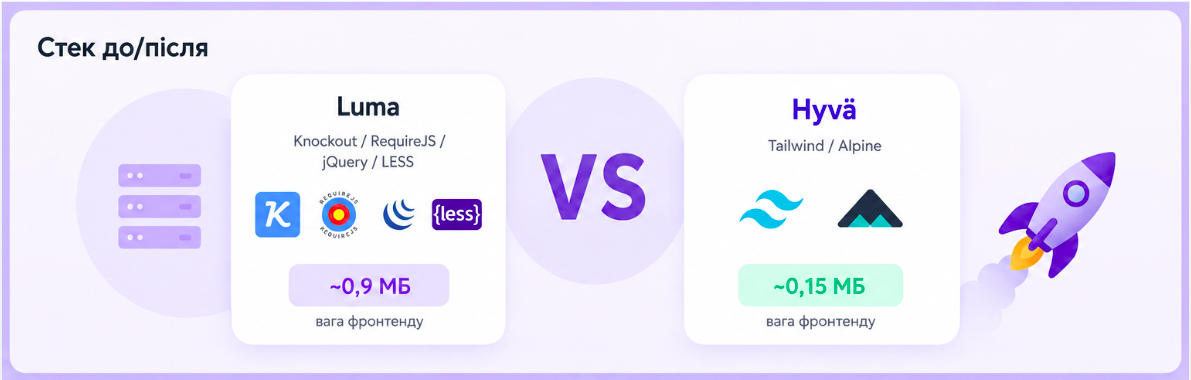
The standard Magento 2 frontend (Luma) is built on a heavy stack: Knockout.js for reactivity, RequireJS for module loading, jQuery, UI components, and LESS. Each of these technologies was justified at the time, but together they now produce a slow, bloated frontend that's hard to maintain. A Luma product page weighs about 0.9 MB of JS/CSS before any content even loads.
Hyvä is a full frontend replacement. It strips out that entire stack and replaces it with two tools: Tailwind CSS for styling and Alpine.js for interactivity. The result: the same product page weighs about 0.15 MB, meaning 4-5 times less code. Lighthouse scores consistently stay above 90, and development becomes simpler and cheaper because the code is clean and readable.
It's important to understand the boundary here: Hyvä only changes the frontend. The Magento backend, catalog, orders, integrations, and admin panel all stay the same. You're not migrating data or rewriting business logic. You're replacing the layer responsible for what the user sees and interacts with.
The current version as of 2026 is Hyvä 1.4.x, which already runs on Tailwind CSS v4 and the new Oxide build engine (written in Rust), which significantly speeds up builds. This is a mature technology backed by hundreds of partner agencies and thousands of compatible extensions.
What changed in 2026: the Hyvä core is now free
This is the most important change, and many people still don't know about it. Until recently, Hyvä cost a one-time fee of €1,000 per store, and that fee was the main barrier to entry.
As of November 10, 2025, the Hyvä core became open source and free (under the OSL 3.0 / AFL 3.0 licenses, the same licenses used by Magento Open Source). The theme is available for free via GitHub and Composer keys in the Hyvä Portal. The €1,000-per-store fee has been eliminated entirely.
What remains paid are specific commercial products, and these should be budgeted for consciously:
Hyvä UI - a set of ready-made UI components, €250 one-time.
Hyvä Checkout - a separate fast checkout system built on Alpine.js and Magewire, around €1,000 one-time (or a subscription of about €250/year). It's optional: you can keep the standard Magento checkout via the Luma fallback.
Hyvä Enterprise / premium support - for large projects, priced separately.
For a business, the takeaway is simple: the theme itself no longer costs anything, but the migration does. The main investment now goes toward developer work rather than a license fee: rebuilding templates, adapting custom features, and verifying extension compatibility. More on that below.
What a business actually gains from migration
Speed. Pages 4-5 times lighter, Core Web Vitals in the green zone, PageSpeed above 90 - especially noticeable on mobile, where most conversion is lost.
Higher conversion. Speed directly affects bounce rate and the number of people who reach checkout. That's a gain without increasing your ad budget.
Cheaper maintenance. Clean Tailwind and Alpine code means every new update is faster and cheaper to build. Luma-style technical debt stops accumulating.
Better SEO. Google factors Core Web Vitals into rankings. A lighter frontend isn't just better UX - it's better search visibility too.
Easier hiring and growth. Tailwind and Alpine are a modern, widely used stack. It's easier to find a developer for them than for Knockout/RequireJS, which few developers want to maintain anymore.
Migration approaches: what works at different stages
The right migration format depends on how customized your current store is, how many third-party extensions it runs, and whether you can afford a pause in development. We choose an approach based on the actual situation, not a template.
01. Full migration (Full Rebuild)
The frontend is rebuilt from scratch on Hyvä for the entire store at once. This is the cleanest result: no leftover Luma, maximum speed, a single stack across the whole site.
This approach makes sense when the store is relatively standard (less custom development means fewer risks), or when the business is ready to invest in a full frontend overhaul alongside a redesign. It costs more and takes longer upfront, but gives the best foundation for scaling. The key condition: development on the current frontend is essentially paused during the work.
02. Phased migration
The store moves over in parts: first the pages most critical to conversion (home, catalog, product page), then the rest. During the transition, part of the site runs on Hyvä and part still runs on Luma.
This reduces risk and lets the business keep selling without interruption. You see the benefit on the most important pages sooner, and migrate the more complex custom pieces last, once the team is already familiar with the process. The downside is a temporary hybrid state and somewhat more total work due to maintaining both stacks during the transition.
03. Hybrid: Hyvä for the conversion core, Luma for legacy content
This is an approach we specifically recommend to stores with a large volume of custom content, and it's the one that lets you capture most of Hyvä's benefits without rebuilding the theme end to end.
The idea is simple. You move to Hyvä the pages that actually affect speed and sales - the conversion core: the catalog (PLP), the product page (PDP), the cart, the homepage, plus the shared header and footer. Pages that are expensive and slow to rebuild stay on Luma. Technically, this is done through the official theme fallback module (hyva-themes/magento2-theme-fallback): for explicitly configured routes or URLs, the Hyvä theme is disabled on those pages and they render with the traditional Luma theme. The transition is invisible to the user.
It usually makes sense to keep the following on Luma:
Checkout- the most heavily customized and highest-risk page, tied to payment and shipping integrations.
Legacy PageBuilder CMS pages - older landing pages and promo pages built from custom PageBuilder components with their own JS and styling.
Account pages - low traffic, low priority.
Why this pays off specifically for content-heavy projects. If a store has dozens of CMS pages built from custom PageBuilder components, or content saved as HTML markup in the page settings, rebuilding them for Hyvä takes weeks of work, since every non-standard component with its own JS/CSS has to be ported by hand. At the same time, these pages on Luma don't load the heaviest product scripts, so they're already relatively lightweight. It always comes down to scope: spending weeks of development rebuilding dozens of landing pages just for a speed gain on those specific pages is often not worth the economics.
The main advantage of this approach: you lose nothing. Old landing pages keep working exactly as before - their content stays valid in the native PageBuilder format in the database, and it can still be edited freely through the admin panel (resaving a page doesn't break or "convert" anything). And every new landing page you build goes straight into Hyvä from the start - clean Tailwind pages that don't add to the legacy pile. In other words, you draw a clear line: old content lives out its life on Luma, new content is built on Hyvä, and your conversion core is already fast.
A fair trade-off. Pages that stay on Luma don't get any speed improvement - they still load the full Luma bundle (RequireJS, jQuery, Knockout). Plus, during the transition you maintain two stacks, and the shared header/footer need to stay visually identical across both so there's no visible "jump" when navigating between them. In exchange, though, you get a fast core and save weeks of development on content that isn't worth the investment. If any legacy page turns out to be a real entry point for paid traffic, it's worth prioritizing separately and migrating it to Hyvä after all - the rest can stay on Luma without issue.
This isn't an "incomplete migration" - it's a deliberate strategy: start getting the benefits of Hyvä quickly, and migrate the rest of the content gradually or not at all, wherever it doesn't pay off.
A note on native PageBuilder. If your CMS pages are built with standard Magento PageBuilder (no custom components), you don't need to keep them on Luma - Hyvä renders native PageBuilder elements out of the box (compatibility is built into the theme). It makes sense to use the Luma fallback specifically for pages with custom components that have their own JS/CSS without Hyvä rendering support. Which case applies to you is determined by a PageBuilder component inventory during the audit stage.
Who should consider this approach
The hybrid approach delivers the most value to a specific business profile:
Content-heavy brands with a lot of PageBuilder legacy. Fashion, cosmetics, electronics, home decor - brands that have spent years building seasonal landing pages, brand zones, promos, and guides with custom PageBuilder components. Dozens or hundreds of CMS pages, where a full migration means weeks or months of rebuilding without direct payoff.
Stores where the money is made in the catalog, not the content. Conversion runs through PLP → PDP → checkout, and CMS is a secondary layer. The core needs to be fast; the content can wait.
Businesses with a limited budget or timeline that need results quickly. Instead of months for a full rebuild, you get a fast core in weeks, a conversion boost where it matters most, and can decide the rest based on data.
Teams where marketing and development shouldn't block each other. Marketers keep building landing pages in the familiar PageBuilder while developers migrate the core. New landing pages are already built for Hyvä, so the legacy pile doesn't grow.
Where the hybrid approach fits less well (worth keeping in mind):
In short: the hybrid approach suits mature, content-rich stores that want to quickly speed up the parts that generate revenue without paying to rebuild the parts that don't.
Small stores with minimal customization - for them, going fully to Hyvä right away is cheaper and cleaner; the hybrid approach would only add overhead from running two stacks.
Stores where content pages are a key entry point for paid traffic - in that case their speed is critical, and leaving them on Luma means losing money exactly where ad spend is going. Here it's worth focusing attention on the CMS pages rather than letting them ride out their life on Luma.
Anyone who needs maximum performance across the entire site - the hybrid approach deliberately leaves part of the site on Luma.
Stages of migrating to Hyvä
Regardless of the approach chosen, we don't start with the build. First comes understanding what already exists, then a plan, and only after that, implementation.
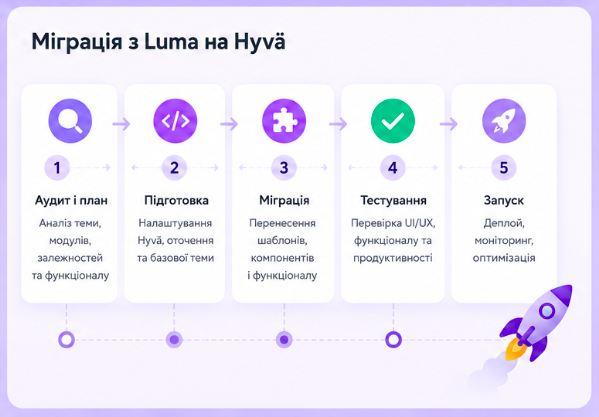
Audit of the current store. We assess how much custom development the site has, which third-party extensions are in use, and which of them have Hyvä compatibility. This is where the real scope of work and the main risks become clear. It's the most important stage - it determines the timeline and the budget.
Extension compatibility audit. We compile a list of all modules and split them into three groups: those that already have official Hyvä compatibility; those that need a separate compat module; and those that will need to be rewritten or replaced. This is the biggest factor in the overall complexity of the migration.
Hyvä setup and base structure. We install the theme, configure the Tailwind config for the brand (colors, typography, spacing as design tokens), and set up the build process.
Template rebuild. The homepage, category pages, product page, static pages, and header/footer are moved to Hyvä. Custom logic that was on jQuery/Knockout gets rewritten in Alpine.js.
Checkout. A separate decision: keep the standard Magento checkout via the Luma fallback, or implement Hyvä Checkout. This depends on how customized your current checkout is and what integrations it involves (payment, shipping).
Integrations and analytics. We verify that all tracking (GA4, Meta Pixel/CAPI, GTM), CRM integrations, and third-party scripts work on the new frontend. This is a common place where something breaks after migration if it isn't checked carefully.
Testing and launch. Cross-browser and mobile testing, speed checks, and verification of checkout and all purchase flows. We compare metrics before and after.
Technical nuances and pitfalls
This is the part businesses need to understand up front, so there are no surprises.
Extension compatibility is the main driver of complexity. Not every third-party module has a Hyvä version of its frontend. For popular extensions, compat modules usually exist (the ecosystem is large - over 700 partners and thousands of compatible extensions). But if you're using a rare or heavily customized module, its frontend will need to be rewritten separately. That's why the extension audit comes first.
Custom JS will need to be rewritten. Any custom logic built on jQuery/Knockout/RequireJS won't run on Hyvä. It needs to be rewritten in Alpine.js. For simple things this is quick; for complex interactive components, it's separate work that needs to be factored into the estimate. Usually, though, there aren't that many such widgets or features on a given project.
Shared blocks in a hybrid setup (mini-cart, header, footer) need attention. In a hybrid scenario, cart data syncs automatically - both Hyvä and Luma read the same Magento customer-data sections, so cart contents and totals match on both types of pages. Visually, though, they're two different implementations: on Hyvä pages the mini-cart is an Alpine component, on Luma it's the old Knockout widget. They need to be kept visually identical so there's no "jump" when moving between zones. ESI block behavior (page_cache/block/esi) should also be tested separately in production with Varnish/FPC - if theme fallback is misconfigured, the mini-cart can get "stuck" and stop updating, and this only shows up in production with caching enabled, not in dev. If legacy pages have "add to cart" buttons, those need to be checked separately too.
Analytics and tracking need to be resynced. Since the entire frontend and DOM change, scripts tied to old Luma selectors or events may stop firing. GA4 eCommerce events, the dataLayer, and pixels all need to be checked and, if needed, re-bound after migration. We pay close attention to this.
What businesses need to know before starting
The biggest mistake is treating a Hyvä migration as "just install a new free theme." The theme really is free, but the value and the cost lie in the quality of the implementation.
The license is now €0, but implementation isn't. The migration budget mainly goes toward developer work: rebuilding templates, rewriting custom logic, and adapting extensions. Plus, if needed, individual products (Hyvä Checkout, Hyvä UI).
ROI is measured in conversion and support costs, not license fees. A faster site converts better, and cheaper maintenance saves money month after month. That's where Hyvä pays off, not from saving money on the theme itself.
An audit before starting is mandatory. Without it, no one can honestly quote a timeline or a budget. Every store has its own set of extensions and customizations, and that's what determines the complexity. Anyone who gives you an exact estimate without a compatibility audit is guessing.
Migration is a starting point, not a finish line. Once the move is done, the frontend becomes easier to develop further, and that's when it makes sense to plan the next stage: conversion optimization, A/B testing, and gradual UX improvements on top of an already fast foundation.
FAQ
How long does migrating to Hyvä take?
It depends on how much customization and how many third-party extensions you have. A simple store can take a few weeks; a complex eCommerce site with a large catalog and many integrations can take months. An audit gives you an exact estimate.
Do I need to pay for Hyvä now?
The theme core has been free (open source) since November 2025. Specific products remain paid - Hyvä UI (€250), Hyvä Checkout (about €1,000), and premium support. The main investment is the implementation work.
Will I lose data or functionality during migration?
No. Hyvä only changes the frontend. The catalog, orders, customers, integrations, and admin panel remain unchanged. Functionality is carried over, not rebuilt from scratch.
What happens to my extensions?
Popular extensions usually have Hyvä compatibility or compat modules. Rare or heavily customized ones may need frontend rework. This is determined during the compatibility audit.
Do I have to buy Hyvä Checkout?
No. You can keep the standard Magento checkout on Luma via the official theme fallback module. Hyvä Checkout makes sense when maximum speed and a simplified checkout flow matter most.
Can I migrate gradually without stopping the store?
Yes. A phased approach lets you move pages over in parts, and theme fallback lets you keep part of the site on Luma during the transition. Sales don't stop during the process.
What should I do with PageBuilder CMS pages?
It depends on how they're built. Hyvä renders native PageBuilder elements out of the box, so those pages migrate along with everything else. Pages with custom components (their own JS/CSS) are slow and expensive to rebuild for Hyvä, so it's practical to keep them on Luma via theme fallback and build new landing pages directly on Hyvä going forward. This is our recommended hybrid approach for projects with a lot of custom content.
Will editing a "Luma" page in the admin panel break the content?
No. PageBuilder stores content in its native format in the database regardless of the frontend theme. The editor works within the admin panel and has no knowledge of Hyvä, so resaving a page doesn't convert or break anything.